Signal Delivery
After subscribing to a signal feed, you need to configure how signals are delivered to your trading infrastructure. Nexgent Signals supports two delivery methods: the Nexgent Trading Engine (recommended) and Webhooks.
Delivery Methods Comparison
| Feature | Trading Engine | Webhooks |
|---|---|---|
| Automated Trading | Yes | Requires custom implementation |
| Setup Complexity | Low (if engine deployed) | Medium |
| Latency | Optimized | Depends on endpoint |
| Authentication | API key | Optional API key |
| Custom Logic | Via engine config | Full flexibility |
| Recommended For | Most users | Advanced integrations |
1. Nexgent Trading Engine (Recommended)
The recommended way to receive signals is by connecting to your self-hosted Nexgent Trading Engine. This enables automated trade execution based on the signals you receive.
Overview
When connected, signals flow directly from Nexgent Signals to your trading engine:
Nexgent Signals → Your Trading Engine → Agent Evaluation → Trade ExecutionSetup Guide
Create API Key in Trading Engine
First, create an API key in your trading engine that has permission to receive signals:
- Open your trading engine dashboard
- Navigate to the Integrations page in the sidebar
- In the API Keys section, click Create Key
- Enter a name (e.g., "Nexgent Signals")
- Select the Restricted tab
- Enable the Signals scope (read & write trading signals)
- Click Create API Key
- Copy the API key — it's only shown once
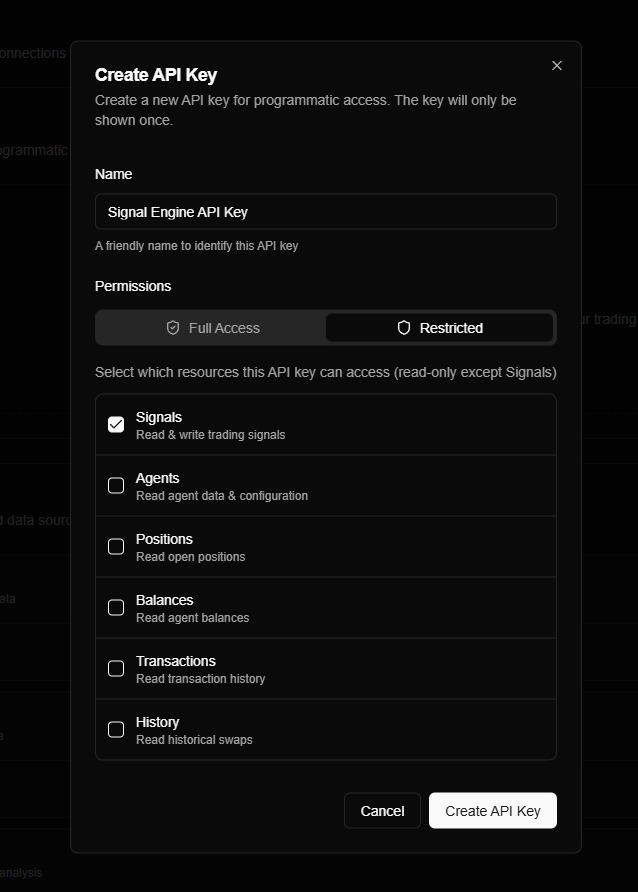
Store your API key securely. If you lose it, you'll need to create a new one.
Configure Delivery in Nexgent Signals
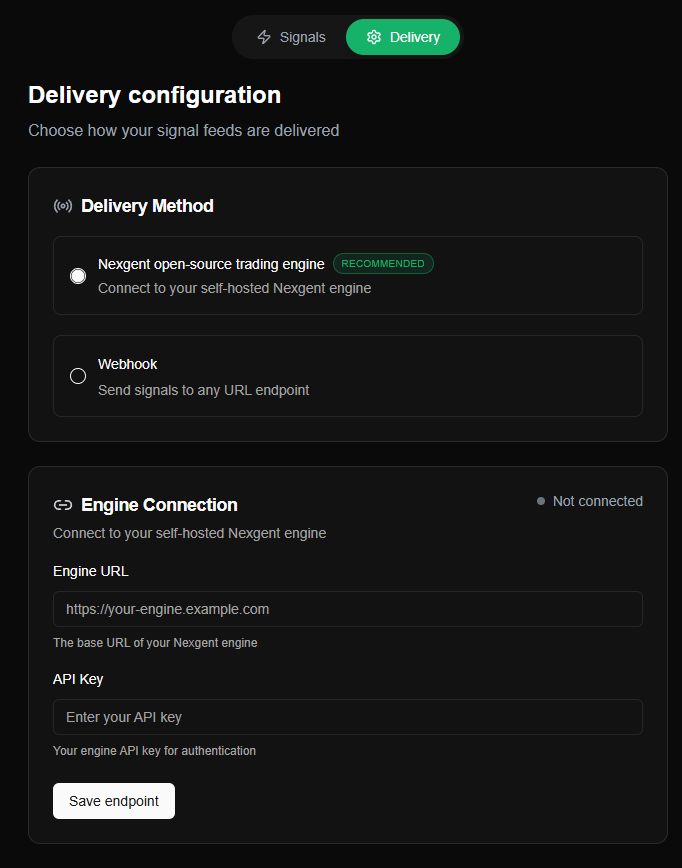
- Go to the Signals Config (opens in a new tab) page
- Select Nexgent open-source trading engine as the delivery method
- Enter your engine's base URL:
https://your-engine.example.com - Enter the API key you created in Step 1
- Click Save endpoint
Test the Connection
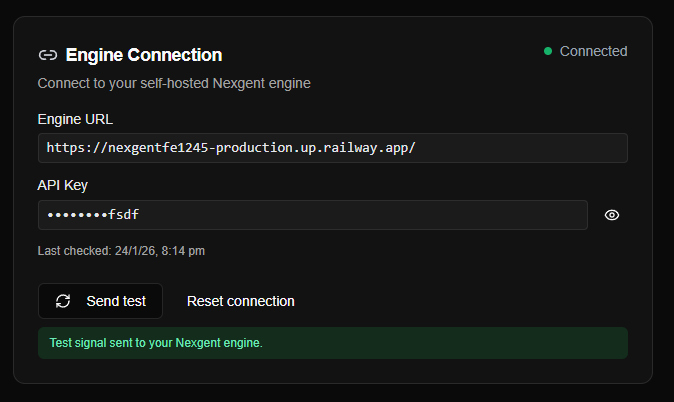
- Click the Send test button
- Verify the status shows "Connected"
- Check your trading engine's signal log to confirm receipt
Troubleshooting Connection
| Issue | Solution |
|---|---|
| Invalid URL | Verify the URL format and ensure it's reachable |
| SSL error | Ensure your engine uses valid HTTPS certificate |
| 401 Unauthorized | Verify API key is correct |
| 403 Forbidden | Ensure API key has Signals scope |
2. Webhook Delivery
Webhook delivery sends signals to any HTTP endpoint you specify. This enables custom integrations with your own trading systems, notification services, or third-party platforms.
Use Cases
- Custom Trading Bot: Receive signals and execute trades with your own logic.
- Notifications: Send alerts to Telegram, Discord, Slack, etc.
- Logging & Analytics: Store signals in a database for backtesting or analysis.
Setup Guide
Prepare Your Endpoint
Create an endpoint that can receive POST requests:
const express = require('express');
const app = express();
app.use(express.json());

app.post('/nexgent/signals', (req, res) => {
  const signal = req.body;
  console.log('Received signal:', signal);
  // Your logic here
  res.status(200).json({ received: true });
});

app.listen(3000);
Configure in Nexgent Signals
- Go to the Signals Config (opens in a new tab) page
- Select Webhook as the delivery method
- Enter your endpoint URL (e.g.,
https://your-server.com/nexgent/signals) - (Optional) Enter an API key for authentication (sent as
Authorization: Bearer your-api-key) - Click Save endpoint
Test the Webhook
- Click Send test button
- Verify your endpoint receives the test signal
Signal Payload Structure
Both delivery methods receive the same JSON payload:
{
  "signalId": "sig_abc123",
  "signalType": "Velocity",
  "tokenAddress": "DezXAZ8z7PnrnRJjz3wXBoRgixCa6xjnB7YaB1pPB263",
  "symbol": "BONK",
  "signalStrength": 4,
  "activationReason": "Sustained momentum with increasing volume",
  "source": "nexgent-signals",
  "timestamp": "2025-01-24T10:30:00Z"
}| Field | Type | Description |
|---|---|---|
signalId | string | Unique signal identifier |
signalType | string | Signal strategy (e.g., "Velocity") |
tokenAddress | string | Solana token mint address |
symbol | string | Token ticker symbol |
signalStrength | number | Confidence level (1-5) |
activationReason | string | Human-readable explanation |
source | string | Signal origin identifier |
timestamp | string | ISO 8601 timestamp |
Security Best Practices
- Use HTTPS: Always use encrypted connections in production.
- Validate Requests: Check the
Authorizationheader if you configured an API key. - IP Allowlisting: If possible, restrict incoming traffic to Nexgent's known IPs.
- Rate Limiting: Protect your endpoint from abuse.