Stale Trade Configuration
Stale trade auto-close automatically closes positions that have been held for a minimum time with modest gains (or small losses) that aren't moving significantly. This frees up capital for new opportunities.
Overview
Stale trade configuration consists of three main settings:
- Enable/Disable - Turn stale trade auto-close on or off
- Minimum Hold Time - How long a position must be held before stale trade check can trigger
- Profit/Loss Range - Range of profit/loss percentages that trigger closure
Access stale trade configuration in Agent Configuration > Trading Strategy > Stale Trade tab.
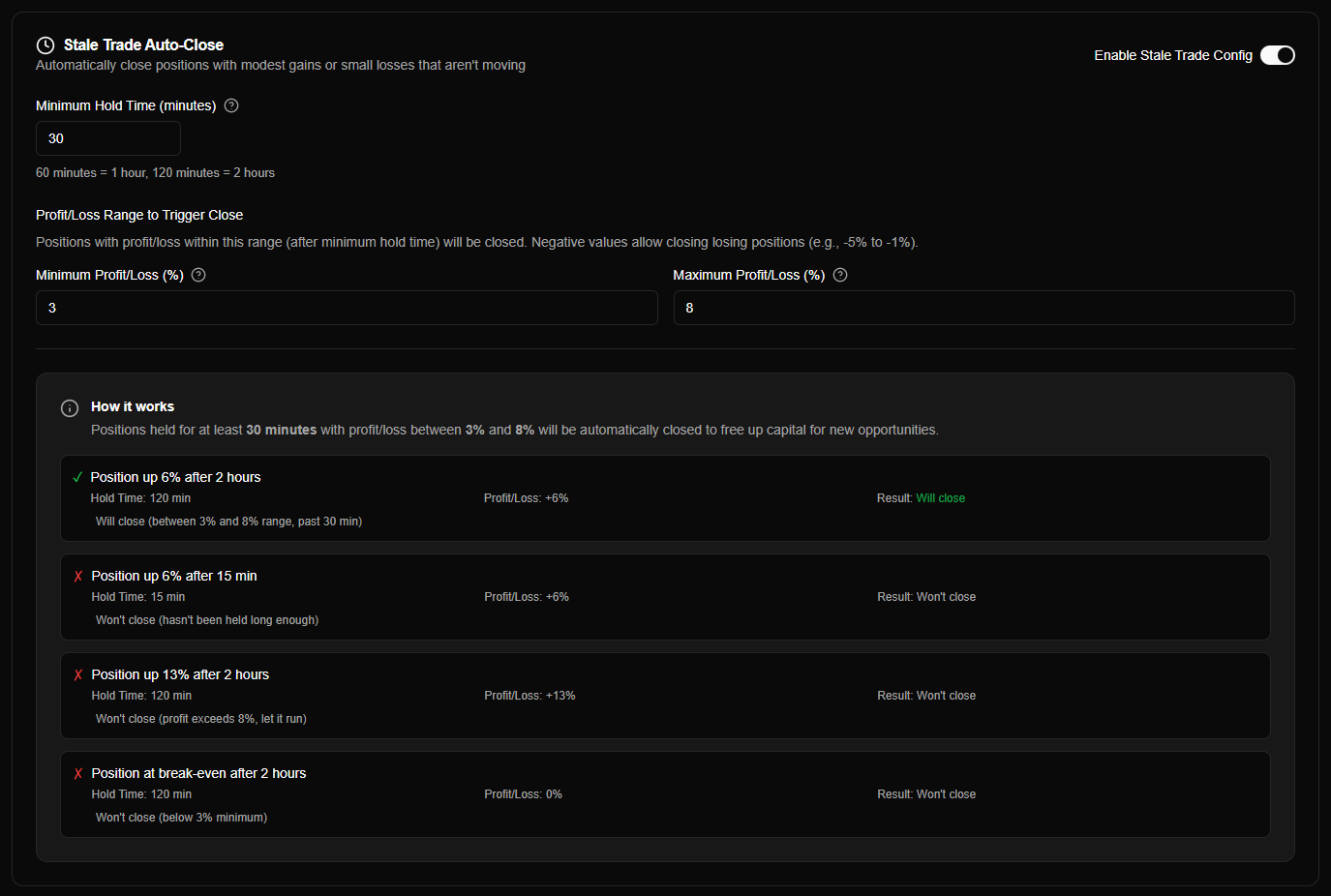
What is Stale Trade Auto-Close?
Stale trade auto-close identifies positions that:
- Have been held for a minimum time period
- Have modest gains or small losses (within configured range)
- Aren't moving significantly (stuck in a narrow range)
These positions tie up capital without generating meaningful returns. Auto-closing them frees capital for new opportunities.
Purpose:
- Free up capital from stagnant positions
- Lock in modest gains before they disappear
- Cut small losses before they grow larger
- Improve capital efficiency
Default behavior:
- Enabled by default
- Closes positions with 1-10% profit after 60 minutes
- Can be configured to close losses (negative range)
Enabling Stale Trade
The stale trade toggle enables or disables automatic closure of stale positions:
| Setting | Description | Default |
|---|---|---|
| Enable Stale Trade Config | Turn stale trade auto-close on/off | Enabled |
When enabled:
- Agent monitors position age and profit/loss on each price update
- Automatically closes positions meeting stale trade criteria
- Frees up capital for new opportunities
When disabled:
- Positions remain open regardless of age or profit/loss
- Manual closure only
- No automatic capital recycling
Stale trade auto-close is enabled by default. It helps improve capital efficiency by closing positions with modest gains that aren't moving.
Minimum Hold Time
The minimum hold time is how long a position must be held before the stale trade check can trigger:
| Setting | Description | Default | Range |
|---|---|---|---|
| Minimum Hold Time (minutes) | Minimum time before stale trade check can trigger | 60 minutes | 1 minute to unlimited |
How it works:
- Timer starts when position is created
- Stale trade check only runs after minimum hold time has elapsed
- Prevents closing positions too early
- Allows positions time to develop before evaluation
Examples:
- 60 minutes (default): Position must be held for at least 1 hour
- 120 minutes: Position must be held for at least 2 hours
- 1440 minutes: Position must be held for at least 24 hours
Conversion:
- 60 minutes = 1 hour
- 120 minutes = 2 hours
- 1440 minutes = 24 hours (1 day)
- 10080 minutes = 168 hours (7 days)
Best practices:
- 30-60 minutes: Short-term trading, quick turnover
- 60-120 minutes (default): Balanced approach
- 240-480 minutes: Longer-term positions, allow more time to develop
- 1440+ minutes: Very long-term, only close truly stale positions
Minimum hold time prevents closing positions too early. Set based on your typical position holding period - shorter for active trading, longer for patient strategies.
Profit/Loss Range
The profit/loss range defines when positions should be closed as stale:
| Setting | Description | Default |
|---|---|---|
| Minimum Profit/Loss (%) | Minimum profit/loss to trigger close | 1% |
| Maximum Profit/Loss (%) | Maximum profit/loss to trigger close | 10% |
How it works:
- Position profit/loss must be within the configured range
- Below minimum → Won't close (too low profit or too large loss)
- Above maximum → Won't close (let it run for higher gains)
- Within range → Will close if minimum hold time has passed
Range examples:
| Range | Behavior |
|---|---|
| 1% to 10% (default) | Closes positions with modest gains (1-10%) |
| -5% to -1% | Closes positions with small losses (-5% to -1%) |
| -3% to 5% | Closes positions from small losses to moderate gains |
| 0% to 0% | Closes only break-even positions |
Negative values:
- Negative min/max allows closing losing positions
- Example: -5% to -1% closes small losses
- Useful for cutting small losses before they grow
Positive values:
- Positive min/max closes profitable positions
- Example: 1% to 10% locks in modest gains
- Default configuration focuses on securing small profits
Mixed ranges:
- Can use negative min with positive max
- Example: -2% to 8% closes from small losses to moderate gains
- Includes break-even positions (0%)
How Stale Trade Works
Evaluation Process
Stale trade is evaluated on every price update (same as stop loss and DCA):
- Check if enabled - Stale trade must be enabled in agent config
- Check minimum hold time - Position age must be >= minimum hold time
- Calculate profit/loss -
profitPercent = ((currentPrice - purchasePrice) / purchasePrice) × 100 - Check profit/loss range - Profit must be within min and max range
- Trigger close - Close position if all conditions met
Important: Stale trade evaluation happens after stop loss evaluation. If stop loss triggers, stale trade check doesn't run.
When Stale Trade Triggers
A position closes as stale when all conditions are met:
| Condition | Example |
|---|---|
| Enabled | Stale trade toggle is ON |
| Hold time passed | Position age >= 60 minutes |
| Profit in range | Profit/loss between 1% and 10% |
Example:
- Position created at $1.00
- After 2 hours, price is $1.05 (5% profit)
- Configuration: 60 min hold time, 1-10% range
- Result: Position closes (all conditions met)
When Stale Trade Doesn't Trigger
Stale trade won't trigger if:
| Condition | Example |
|---|---|
| Too early | Position age < 60 minutes |
| Profit too low | Profit < 1% (or below minimum) |
| Profit too high | Profit > 10% (or above maximum) |
| Stop loss triggered | Stop loss closes position first |
Examples:
- Position 30 minutes old with 5% profit → Won't close (too early)
- Position 2 hours old with 0% profit → Won't close (below 1% minimum)
- Position 2 hours old with 15% profit → Won't close (above 10% maximum, let it run)
Configuration Examples
Modest Gains (Default)
Configuration:
- Minimum Hold Time: 60 minutes
- Minimum Profit: 1%
- Maximum Profit: 10%
Behavior: Closes positions with 1-10% profit after 1 hour
Example scenarios:
- Position up 5% after 2 hours → Closes (within range, past hold time)
- Position up 15% after 2 hours → Doesn't close (above max, let it run)
- Position up 5% after 30 minutes → Doesn't close (too early)
Best for: Locking in modest gains from positions that aren't moving significantly.
Stale Trade vs Stop Loss
Stale trade and stop loss serve different purposes:
| Aspect | Stale Trade | Stop Loss |
|---|---|---|
| Purpose | Free capital from stagnant positions | Protect against large losses |
| Trigger | Modest gains/small losses + time | Large drops below threshold |
| Range | Narrow range (e.g., 1-10%) | Any price below stop loss level |
| Time component | Requires minimum hold time | Immediate (no time requirement) |
| Capital efficiency | Recycles capital | Limits losses |
Can use both together:
- Stale trade: Closes positions with modest gains/small losses after time
- Stop loss: Closes positions on large drops immediately
- Combined: Comprehensive position management strategy
Evaluation order:
- Stop loss is evaluated first
- If stop loss doesn't trigger, stale trade is evaluated
- If stale trade doesn't trigger, DCA is evaluated
Configuration Best Practices
Choosing Minimum Hold Time
| Hold Time | Use Case |
|---|---|
| 30-60 minutes | Active trading, quick turnover |
| 60-120 minutes | Balanced approach (default) |
| 240-480 minutes | Longer-term positions, patient strategy |
| 1440+ minutes | Very long-term, only close truly stale |
Recommendation: Start with 60 minutes (default). Adjust based on your typical position holding period.
Setting Profit/Loss Range
| Range Type | Use Case |
|---|---|
| 1-10% (positive) | Lock in modest gains (default) |
| -5% to -1% (negative) | Cut small losses early |
| -2% to 5% (mixed) | Free capital from break-even positions |
| Custom range | Match your specific strategy |
Recommendation: Start with 1-10% (default). Adjust based on whether you want to focus on gains, losses, or both.
Risk Management Considerations
When to enable stale trade:
- Want to free up capital from stagnant positions
- Prefer locking in modest gains over holding forever
- Active trading strategy with multiple positions
When to disable stale trade:
- Long-term holding strategy
- Want to let positions run regardless of small gains
- Manual position management preferred
Balance with stop loss:
- Use stale trade for modest gains/small losses
- Use stop loss for large drops
- Combined strategy provides comprehensive protection
Common Questions
What happens if I disable stale trade?
When disabled:
- No automatic closure of stale positions
- Positions remain open regardless of age or profit/loss
- Manual closure only
- No automatic capital recycling
You can re-enable stale trade anytime - it will start evaluating positions from that point forward.
Can I use stale trade with stop loss?
Yes! Stale trade and stop loss work together:
- Stop loss: Closes on large drops immediately
- Stale trade: Closes modest gains/small losses after time
Stop loss is evaluated first - if it triggers, stale trade check doesn't run.
Does stale trade work in simulation mode?
Yes! Stale trade works identically in both simulation and live modes. Test your stale trade configuration in simulation before going live.