Understanding Signals
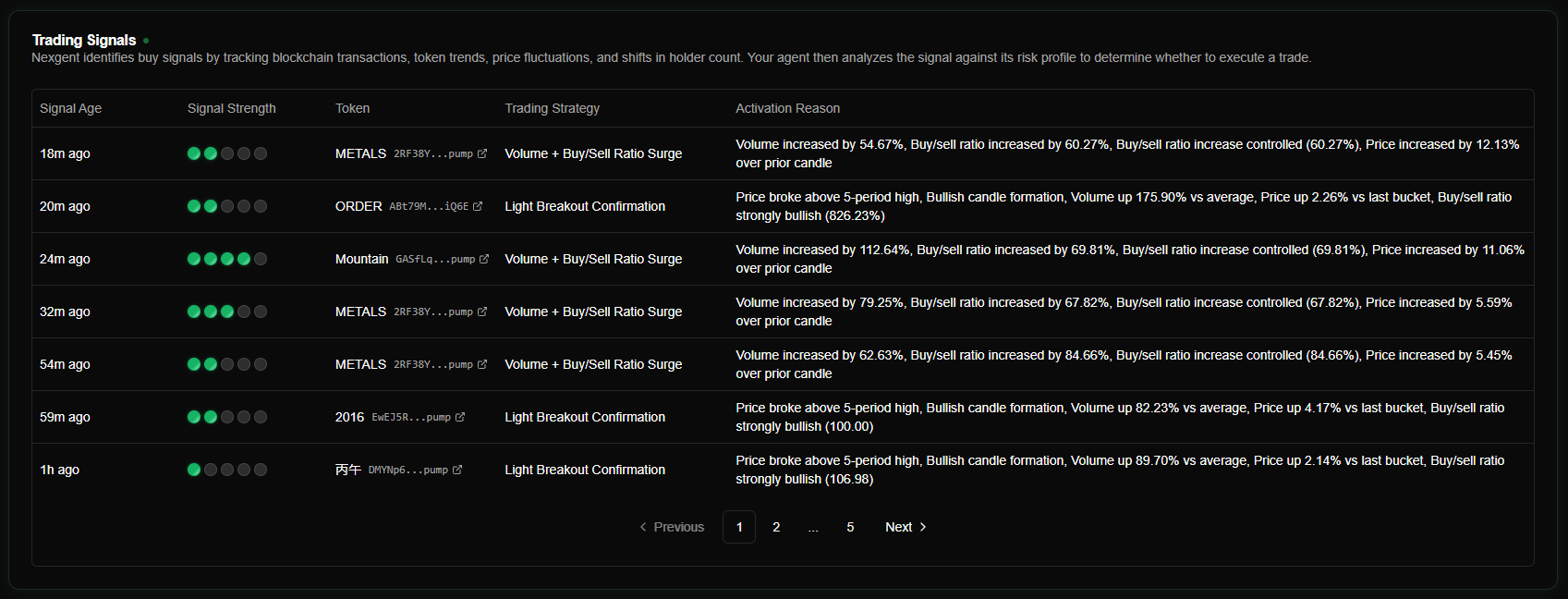
Trading signals are notifications about potential market opportunities. They act as the trigger for agents to execute trades. Signals are passive data packets; agents evaluate each one against their own configuration to decide whether to act.
Signal Components
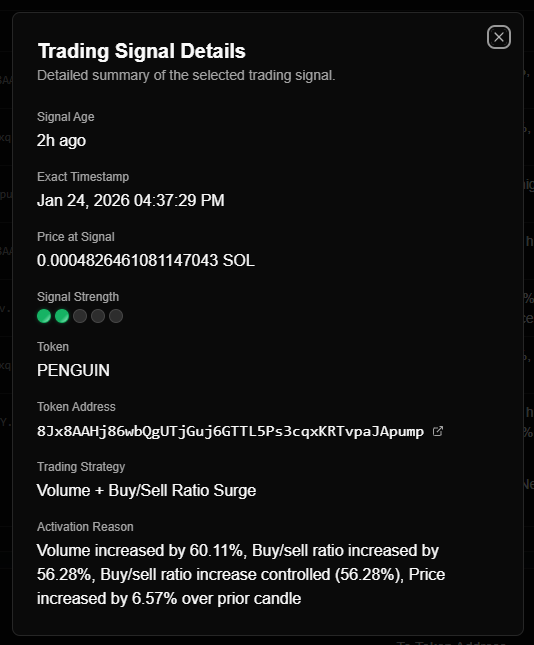
Every signal contains specific metadata used for evaluation and dashboard display:
| Field | Required | Description |
|---|---|---|
| tokenAddress | Yes | Solana token mint address (base58). |
| symbol | No | Human-readable symbol (e.g., "BONK") for dashboard display. |
| signalType | Yes | Metadata category (BUY, Hypersurge, Breakout confirmation, Price Reversal, etc.). |
| signalStrength | Yes | Quality score from 1 to 5 (integer). |
| activationReason | No | Text description of why the signal was triggered. |
| source | No | The signal provider/origin (e.g., "Nexgent AI"). |
Signal Type & Strength
- Types: Common types include
BUY,Hypersurge,Breakout confirmation,Price Reversal, or any custom string. Agents can be configured to filter for specific strategy types, or accept all by default. - Strength (1-5): Used by agents to filter opportunities.
- 4-5: Recommended for production.
- 3: Good for testing.
- 1-2: High false-positive rate; typically ignored.
How Agents Evaluate Signals
When a signal is received, all active agents process it through a filter chain. A trade is only executed if all filters pass:
| Filter | Logic | Default |
|---|---|---|
| Automated Trading | Must be enabled for the current mode (Simulation or Live). | Enabled |
| Signal Strength | Must be greater than or equal to the agent's minScore. | ≥ 4 |
| Signal Type | Must be in the agent's allowed types list (if any are specified). | All accepted |
| Blacklist | Token address must not be in the agent's blacklist. | (Empty) |
| Whitelist | If enabled, the token address must be in the whitelist. | Disabled |
| Balance | Agent wallet must have enough SOL to execute the trade. | ≥ 0.5 SOL |
Filter settings are unique to each agent. You can configure them in the Agent Configuration section.
Lifecycle of a Signal
- Creation: A signal is posted via the API or a Webhook.
- Broadcasting: The system sends the signal to all running agents.
- Evaluation: Each agent independently runs the filter chain (Sub-500ms).
- Execution: Eligible agents execute trades in parallel.
- Tracking: The result (success, skip, or error) is logged with the signal and agent IDs for analytics.
Common Strategy Patterns
Conservative
- Score: 5 only.
- Filtering: Strict whitelist + broad blacklist of known scam tokens.
- Result: Low frequency, high conviction trades.
FAQ
Do all signal types trigger purchases?
Yes, provided they pass the agent's filters. You can configure an agent to only respond to specific types (e.g., only Breakout confirmation), or leave the list empty to accept all types.
What happens if multiple agents are eligible? They all execute trades simultaneously in parallel. Each agent uses its own assigned wallet and configuration.
How fast is the execution? Typically sub-500ms from the moment the signal hits the API to the trade execution start.
Can I see why an agent ignored a signal? Yes. Execution logs track the status of every signal evaluation, including which filter (strength, blacklist, etc.) caused a skip.