Historical Swaps
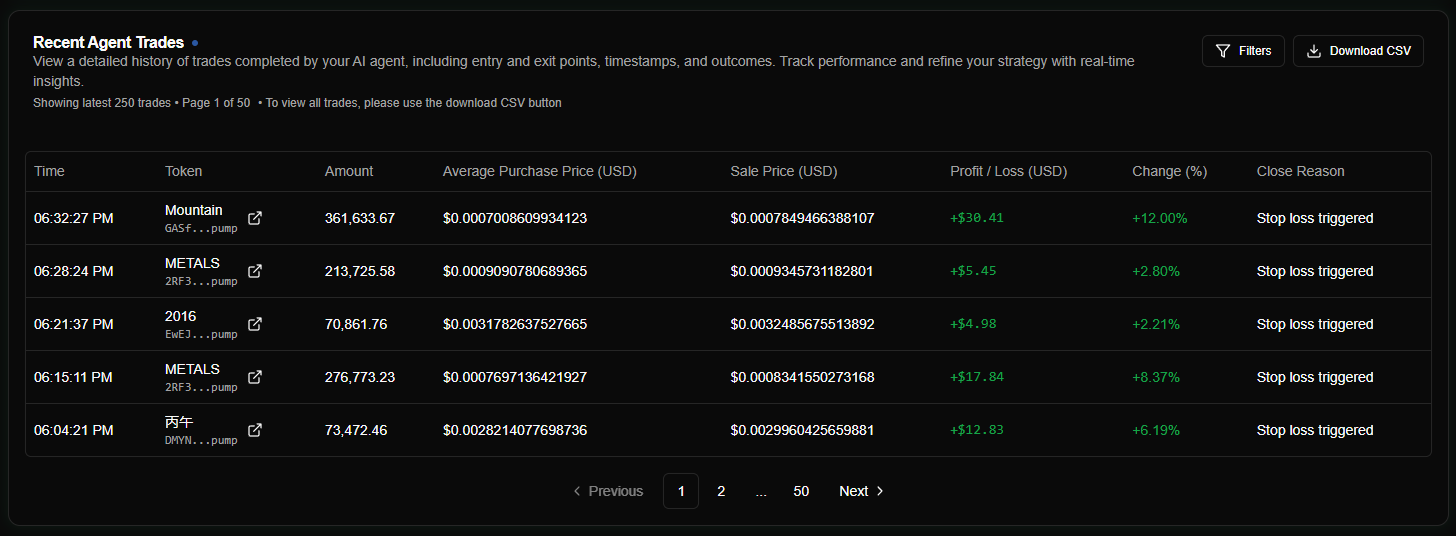
Historical swaps represent completed trades - pairs of purchase and sale transactions that form a full trading cycle. They track the entire lifecycle from entry to exit, providing the basis for all performance metrics and tax reporting.
Overview
A historical swap is created automatically when a position is closed. The system pairs the original purchase (including any DCA buys) with the final sale to calculate realized profit or loss.
Lifecycle of a Swap
- Entry: Agent executes a
SWAP(SOL → Token). - Monitoring: Position is tracked; weighted average price updates if DCA buys occur; take-profit sales may execute if enabled.
- Exit: Position closure is triggered via Manual Close, Stop Loss, Stale Trade, or final Take-Profit level.
- Realization: The system executes the final
SWAP(Token → SOL) and asynchronously generates theAgentHistoricalSwaprecord. - Analytics: Performance metrics (Win Rate, Average Return) are updated instantly.
Positions with Take-Profit: If take-profit was enabled, partial sales may have occurred before the final close. The historical swap record captures the full position lifecycle, including all take-profit sales aggregated into the final P/L.
Swap Data Structure
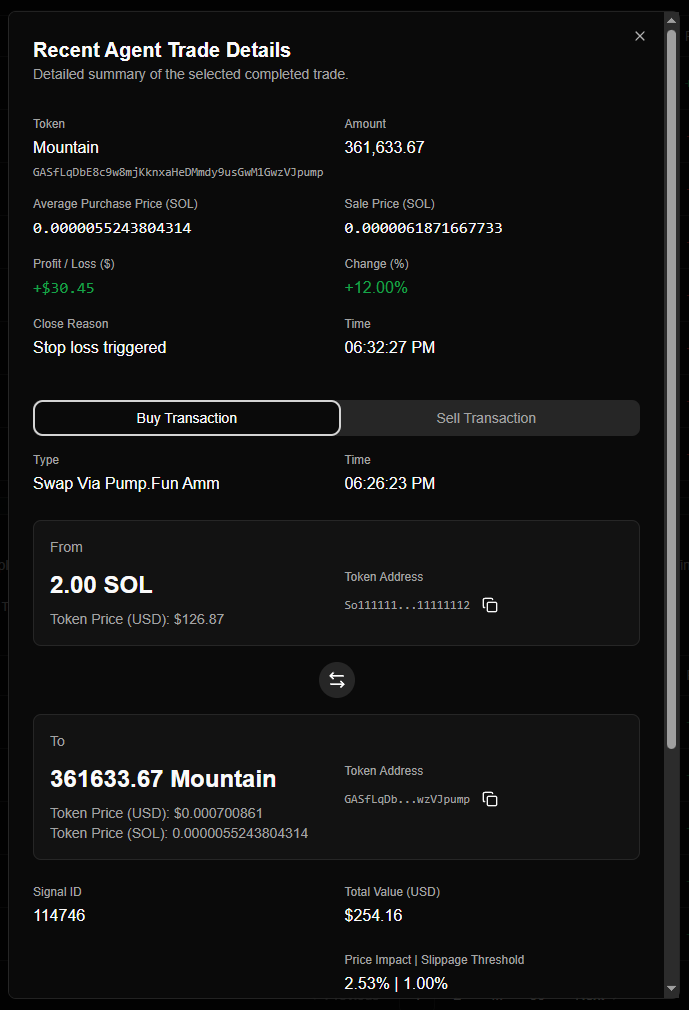
Each record captures the full context of the trade cycle:
| Field | Description |
|---|---|
| amount | Total token amount traded (original position size). |
| purchasePrice | Weighted average cost basis per token (accounts for DCA). |
| salePrice | Effective average sale price per token (accounts for take-profit + final sale). |
| changePercent | Total return percentage from entry to exit (based on original cost). |
| profitLossUsd/Sol | Total realized profit or loss (includes all take-profit sales + final close). |
| purchase/saleTime | Precise timestamps for entry and exit. |
| closeReason | Why the position was sold (manual, stop_loss, stale_trade, or take_profit). |
| transactionIds | UUID links to the raw AgentTransaction records. |
Positions with Take-Profit: The amount reflects the original position size, not the final remaining amount. The salePrice is the effective average across all sales (take-profit + final close), and profitLossSol includes profit from all partial sales.
Calculations & Cost Basis
Weighted Average Purchase Price
To accurately track P&L when using DCA (Dollar Cost Averaging), Nexgent calculates a weighted average:
Formula: purchasePrice = totalInvestedSol / totalTokensHeld
This ensures that if you "buy the dip," your cost basis decreases, and your profit/loss reflects the true performance of the entire position size.
Realized Profit/Loss
Profit and loss are calculated after the final sale transaction completes:
- SOL P&L:
(salePrice - purchasePrice) * amount - USD P&L:
profitLossSol * solPriceAtExit - Return %:
((salePrice - purchasePrice) / purchasePrice) * 100
Positions with Take-Profit Sales
For positions where take-profit executed partial sales before final close:
Effective Average Sale Price:
salePrice = totalSolReceived / totalTokensSoldWhere totalSolReceived = sum of SOL from all take-profit sales + final close.
Total P/L:
profitLossSol = realizedProfitFromTakeProfits + profitFromFinalSaleReturn % is calculated against the original cost basis, not the remaining position:
changePercent = (totalProfitSol / originalCostBasisSol) * 100This ensures the historical record reflects the true performance of the entire trading cycle.
Performance & Reporting
Strategic Review
Use the Recent Trades table to analyze your agent's effectiveness:
- Win Rate: The percentage of swaps with a positive
changePercent. - Hold Time: Calculate the duration between
purchaseTimeandsaleTime. - Signal Efficacy: Identify which
signalIdsources lead to the highest returns.
Best Practices
- Audit Regularly: Compare historical swaps against your Agent Activity log to ensure balance reconciliation.
- Correlation Analysis: Check the
signalIdlinked to your best trades to identify high-conviction signal providers. - Mode Awareness: Remember that simulation mode swaps are virtual; always verify your strategy in simulation for 24-48 hours before assigning a live wallet.