Transaction Types
Nexgent AI tracks three types of transactions for each agent: DEPOSIT, SWAP, and BURN. Each transaction type serves a specific purpose and is recorded with detailed information for tracking and analytics.
Overview
All agent transactions are stored in the agent_transactions table and include metadata (ID, agent, wallet, timestamp), transaction type (DEPOSIT, SWAP, BURN), value information (USD value, token amounts, prices), and related data (signal ID, destination address).
Transactions update balances atomically and trigger cache updates for real-time dashboard display.
Transaction Types
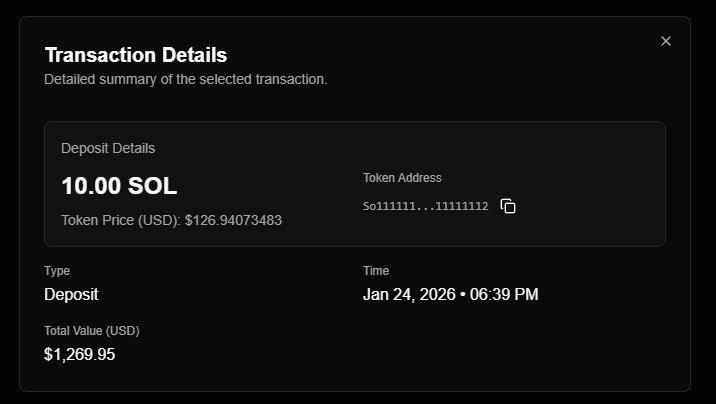
DEPOSIT
Purpose: Add funds to an agent's wallet
| Aspect | Description |
|---|---|
| When it occurs | User deposits funds (simulation or live) |
| Balance effect | Increases wallet balance |
| Token | Typically SOL (native token) |
| Execution | Simulation: Virtual balance update Live: On-chain balance sync |
Fields: transactionType (DEPOSIT), transactionValueUsd, inputMint, inputAmount, destinationAddress
SWAP
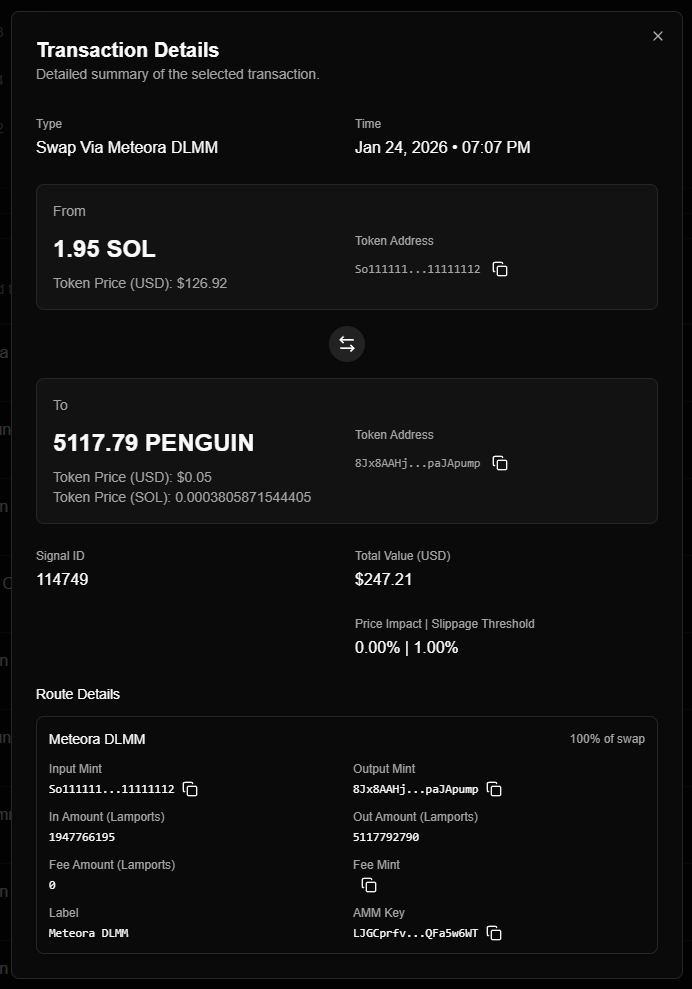
Purpose: Exchange one token for another (purchase or sale)
| Aspect | Description |
|---|---|
| When it occurs | Agent executes a token swap (purchase or sale) |
| Balance effect | Decreases input token, increases output token |
| Execution | Simulation: Mock swap result Live: On-chain swap via Jupiter Aggregator |
| Details | Includes input/output amounts, prices, slippage, fees |
Fields:
transactionType:"SWAP"transactionValueUsd: Swap value in USDinputMint: Token being sold (mint address)inputSymbol: Token symbol being soldinputAmount: Amount of input tokeninputPrice: Price per unit of input tokenoutputMint: Token being bought (mint address)outputSymbol: Token symbol being boughtoutputAmount: Amount of output token receivedoutputPrice: Price per unit of output tokenslippage: Slippage percentagepriceImpact: Price impact percentagefees: Transaction fees (in USD)isDca: Whether this is a DCA purchaseisTakeProfit: Whether this is a take-profit salesignalId: Signal that triggered the swap (if applicable)transactionHash: On-chain transaction hash (live mode only)
Purchase swap (SOL → Token): inputMint = SOL, outputMint = Token
Sale swap (Token → SOL): inputMint = Token, outputMint = SOL
Take-Profit Sales
SWAP transactions with isTakeProfit: true are partial sales triggered when price reaches configured take-profit levels:
- Partial: Sells a percentage of the original position, not the entire holding
- Multiple: A position can have multiple take-profit sale transactions before final close
- Position remains open: Unlike stop loss or manual close, the position stays active after a take-profit sale
- Realized profit: Each take-profit sale locks in profit on the sold portion
Use the isTakeProfit filter when querying transactions to retrieve only take-profit sales. Multiple take-profit transactions may exist for a single position.
BURN (simulation only)
Purpose: Destroy tokens (remove from circulation)
| Aspect | Description |
|---|---|
| When it occurs | Tokens are burned/destroyed |
| Balance effect | Decreases token balance |
| Execution | On-chain burn transaction (live mode) |
| Use case | Token destruction, deflationary mechanisms |
Fields: transactionType (BURN), transactionValueUsd, inputMint, inputAmount, inputPrice
Transaction Structure
All transactions share common fields:
| Field | Type | Description |
|---|---|---|
| id | string (UUID) | Unique transaction identifier |
| agentId | string (UUID) | Agent that owns the transaction |
| walletAddress | string | Wallet address (simulation or live) |
| transactionType | enum | DEPOSIT, SWAP, or BURN |
| transactionValueUsd | decimal | Transaction value in USD |
| transactionTime | datetime | When transaction occurred |
| destinationAddress | string (optional) | Destination wallet address |
| signalId | number (optional) | Signal that triggered transaction |
| createdAt | datetime | When record was created |
| updatedAt | datetime | Last update timestamp |
SWAP-specific fields:
- Input/output token details (mint, symbol, amount, price)
- Slippage and price impact
- Fees
- Transaction hash (live mode)
- DCA flag
Transaction Lifecycle
Creation
Transactions are created when:
- User action - Deposit via dashboard
- Agent trading - SWAP executed by agent
- External event - On-chain transaction detected (live deposits)
Balance Update
Transactions update balances atomically (balance update and transaction creation happen together). After commit: Redis cache updated, dashboard displays real-time balance, WebSocket notifies clients.
Guarantees: Atomicity, consistency (balances match transaction history), isolation (concurrent transactions don't interfere)
Transaction Viewing
View transactions in the dashboard:
Filtering: By type (DEPOSIT, SWAP, BURN), token, signal, date range, wallet (simulation or live)
Transaction details: Full transaction information, related signal (if applicable), input/output token details (SWAP), slippage/fees/price impact (SWAP), on-chain transaction hash (live SWAP)
Common Patterns
Purchase Flow
Trigger: Trading signal received
Steps:
- Agent evaluates signal (eligibility check)
- SWAP transaction created: SOL → Token
- Balances updated (SOL decreases, Token increases)
- Position created (if new token)
- Transaction recorded with signal ID
Transaction details:
- Type:
SWAP - Input: SOL amount
- Output: Token amount
signalId: Signal that triggered purchaseisDca:trueif DCA purchase,falseotherwise
Transaction Relationships
Signals
SWAP transactions link to signals via signalId: purchase SWAPs use the signal that triggered the trade, sale SWAPs use the original purchase signal from the position. DEPOSIT and BURN are not signal-related.
Positions
Purchase SWAP: Creates new position (if token not held) or updates existing position (DCA)
Sale SWAP: Closes position and creates historical swap record
Historical Swaps
Sale SWAP transactions create historical swap records linking purchase and sale transactions (trade pairs).
Best Practices
Monitor transaction volume: Track frequency per type, identify unusual patterns, monitor balance changes.
Review transaction details: Check slippage and fees (SWAP), verify on-chain hashes (live SWAP), confirm signal associations.
Balance reconciliation: Verify transaction history matches balances, reconcile with on-chain data (live mode).
Transaction analysis: Use for performance analysis, fee tracking, strategy optimization, tax reporting.