Take Profit Configuration
Take Profit automatically sells portions of your position as price increases, locking in gains at predefined milestones. This guide explains how to configure take-profit settings for your trading agent.
Overview
Take-profit configuration consists of four main settings:
- Enable/Disable - Turn take-profit on or off
- Take-Profit Mode - Preset levels or custom configuration
- Take-Profit Levels - Price gain targets and sell percentages
- Moon Bag - Optional portion retained indefinitely
Access take-profit configuration in Agent Configuration > Trading Strategy > Take Profit tab.
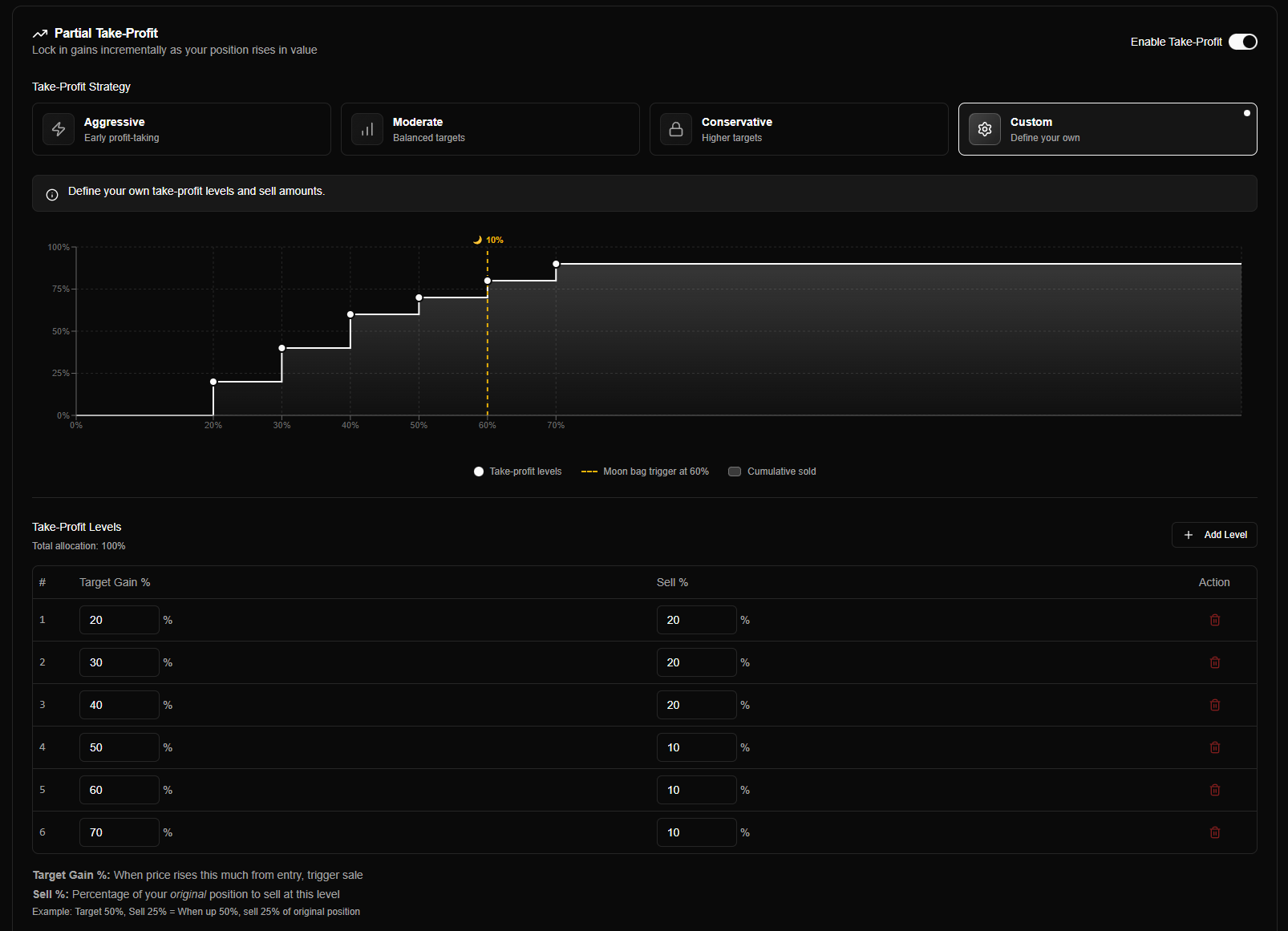
What is Take Profit?
Take Profit is the opposite of DCA:
| Aspect | Take Profit | DCA |
|---|---|---|
| Direction | Sell on gains | Buy on dips |
| Purpose | Lock in profits | Lower cost basis |
| Risk | Less exposure | More exposure |
| Best for | Securing gains | Averaging down |
| Default | Disabled | Disabled |
How it works:
- When price rises above your purchase price (or DCA average)
- Agent automatically sells a portion at each configured gain level
- Remaining position continues to be monitored
- Profits are locked in progressively
Example:
- Purchase: 1 SOL buys 1000 tokens at $0.001 SOL/token
- Price rises 50% → Sell 25% (250 tokens) → Lock in profit
- Price rises 150% → Sell another 25% (250 tokens) → Lock in more profit
- Continue until all levels hit or moon bag activated
Enabling Take Profit
The take-profit toggle enables or disables automatic profit-taking:
| Setting | Description | Default |
|---|---|---|
| Enable Take Profit | Turn take-profit on/off | Disabled |
When enabled:
- Agent monitors price gains from purchase price
- Triggers partial sales at configured gain levels
- Automatically locks in profits progressively
- Respects moon bag settings if enabled
When disabled:
- No automatic sales on price increases
- Manual position closure only
- Full position held until stop loss or manual close
Take Profit and DCA together: You can enable both Take Profit and DCA on the same agent. Take Profit sells on price rises; DCA buys on price drops. The engine evaluates both and can run partial take-profit sales and DCA buys on the same position as conditions are met.
Take-Profit Modes
Take-profit modes define when to trigger sales and how much to sell. Choose a mode based on your profit-taking strategy.
Mode Selection
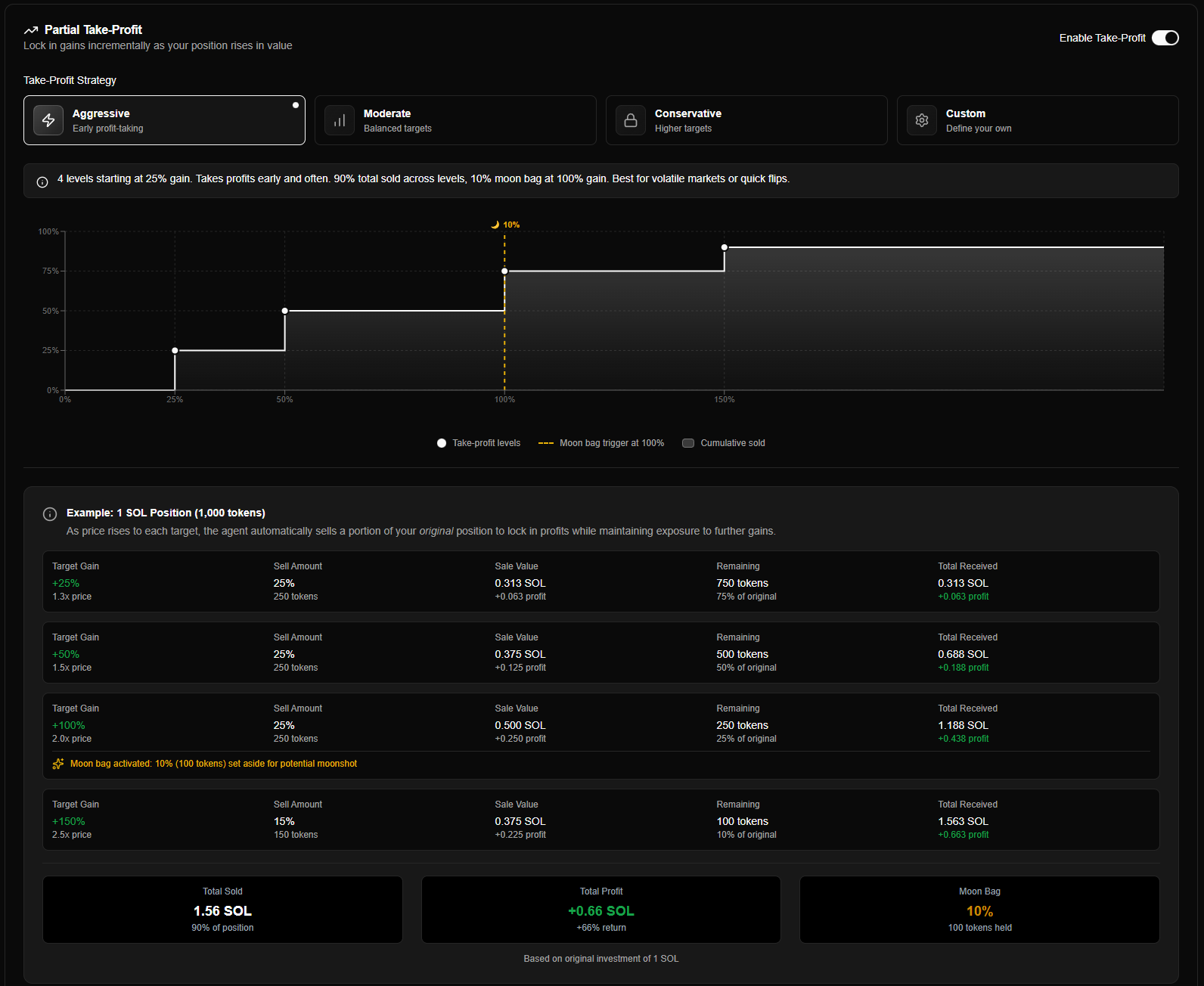
Five modes are available:
| Mode | Description | Best For |
|---|---|---|
| Aggressive | Early profit-taking at lower gains | Quick profits, volatile tokens |
| Moderate | Balanced levels across the gain curve | Standard positions, balanced approach |
| Conservative | Higher gain targets, let winners run | Strong conviction, momentum plays |
| Moon Bag | Retains 10% permanently after 300% gain | Long-term holds, "never sell all" |
| Custom | Manual discrete levels you define | Advanced users, specific strategies |
Select your mode using the mode selector in the Take Profit tab. Each mode displays a brief explanation and visual chart when selected.
Mode Details
Moderate Mode (Default)
Behavior: Balanced profit-taking across the gain curve. Good for most traders.
Configuration: Predefined levels (no additional configuration needed).
| Level | Target Gain | Sell % | Cumulative Sold |
|---|---|---|---|
| 1st | 50% | 25% | 25% |
| 2nd | 150% | 25% | 50% |
| 3rd | 300% | 25% | 75% |
| 4th | 400% | 25% | 100% |
Example (1000 tokens purchased):
- 50% gain → Sell 250 tokens (25%)
- 150% gain → Sell 250 tokens (25%)
- 300% gain → Sell 250 tokens (25%)
- 400% gain → Sell 250 tokens (25%)
- Position fully closed
| Characteristics | Notes |
|---|---|
| Balanced levels | Spread across 50%-400% gains |
| Moderate exits | Gradual profit-taking |
| Good coverage | Captures both small and large gains |
| Flexible | Works for most tokens |
Best for: Standard positions, balanced approach. Recommended for most traders.
Moon Bag Configuration
The moon bag feature allows you to retain a portion of your position indefinitely, even after all take-profit levels are hit.
Moon Bag Settings
| Setting | Description | Default | Range |
|---|---|---|---|
| Enable Moon Bag | Turn moon bag feature on/off | Enabled (in Moon Bag mode) | On/Off |
| Trigger Percent | Gain percentage at which to activate moon bag | 300% | 50% to 1000% |
| Retain Percent | Percentage of original position to keep | 10% | 1% to 50% |
How Moon Bag Works
- Activation: When price reaches the trigger percent gain, the moon bag is "set aside"
- Protection: The retained amount is excluded from future take-profit sales
- Retention: Moon bag remains until stop loss triggers or manual close
- Stop Loss Override: If stop loss triggers, everything is sold including moon bag
Example:
- Original position: 1000 tokens
- Moon bag: Trigger at 300%, Retain 10%
- At 300% gain: 100 tokens (10%) set aside as moon bag
- Take-profit levels can only sell the remaining 900 tokens
- If stop loss triggers: All 1000 tokens (including moon bag) are sold
Moon bag must be allocated before the final take-profit level. If your take-profit levels would sell 100% before the moon bag trigger, the system automatically adjusts to ensure the moon bag is set aside.
When to Use Moon Bag
| Scenario | Moon Bag | Reasoning |
|---|---|---|
| Strong long-term conviction | ✅ Enable | Capture potential future gains |
| Quick flip / scalping | ❌ Disable | Want full exit on profits |
| Uncertain market | ✅ Enable | Hedge by keeping exposure |
| Capital rotation needed | ❌ Disable | Want full capital return |
Take-Profit Levels Chart
The Take Profit tab includes a visual chart showing your configured levels and how they map to price gains.
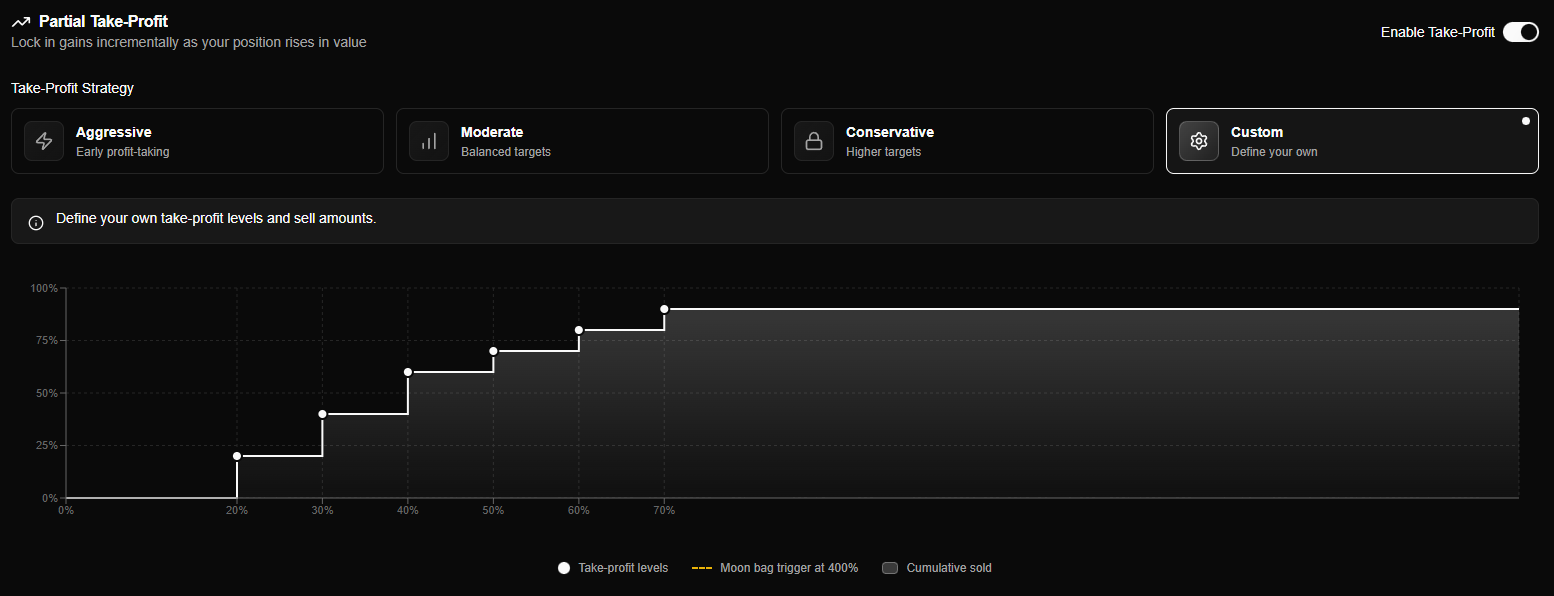
Take-profit chart showing gain levels, sell percentages, and moon bag threshold
The chart shows:
- X-axis: Price gain percentage (0% to configured max)
- Y-axis: Cumulative percentage sold
- Bars/Steps: Each take-profit level
- Moon bag line: Trigger threshold (if enabled)
Use the chart to visualize your profit-taking strategy and ensure levels are configured as intended.
How Take Profit Works
Per-Level Calculation (Original Amount)
Important: Each take-profit level's sell amount is calculated as a percentage of the ORIGINAL position, not the remaining amount.
Original Position: 1000 tokens

Level 1 (50% gain):  Sell 25% of 1000 = 250 tokens
Level 2 (150% gain): Sell 25% of 1000 = 250 tokens (NOT 25% of 750)
Level 3 (300% gain): Sell 25% of 1000 = 250 tokens
Level 4 (400% gain): Sell 15% of 1000 = 150 tokens
Moon Bag: Retain 10% of 1000 = 100 tokens

Total: 250 + 250 + 250 + 150 + 100 = 1000 tokens (100%)
This ensures predictable, consistent profit-taking regardless of execution order.
Gap Handling (Price Jumps)
If price jumps over multiple take-profit levels, all missed levels are executed together:
Example:
- Levels: 50% (sell 25%), 100% (sell 25%), 200% (sell 25%)
- Price jumps from 40% gain to 120% gain
- Both 50% and 100% levels are triggered simultaneously
- Total sold: 50% (25% + 25%)
This prevents missed profit-taking opportunities due to rapid price movements.
Take-Profit Evaluation Process
Take-profit is evaluated on every price update:
- Check if enabled - Take-profit must be enabled in agent config
- Calculate gain -
gainPercent = ((currentPrice - purchasePrice) / purchasePrice) × 100 - Find levels - Match gain to any unexecuted levels
- Check moon bag - Activate moon bag if threshold reached
- Trigger sale - Execute partial sale for matched levels
DCA can be enabled on the same agent; take-profit and DCA are evaluated independently on each price update.
Take Profit vs Stop Loss Interaction
Take-profit and stop loss work together:
- Take-profit: Sells portions when price rises (locks in gains)
- Stop loss: Sells remaining position if price drops too far (limits losses)
Combined protection:
- Take-profit locks in profits as price rises
- Stop loss protects remaining position (including moon bag) on reversals
- Both calculated from original purchase price
Stop loss sells everything remaining, including moon bag. Take-profit respects moon bag; stop loss overrides it.
Allocation Validation
The system validates that your total allocation doesn't exceed 100%:
Total Sell % (all levels) + Moon Bag Retain % ≤ 100%Valid configuration:
- Levels: 25% + 25% + 25% + 15% = 90%
- Moon bag: 10%
- Total: 100% ✅
Invalid configuration:
- Levels: 25% + 25% + 25% + 25% = 100%
- Moon bag: 10%
- Total: 110% ❌
If your configuration exceeds 100%, an error alert is displayed and you cannot save until corrected.
Exceeds 100%: If total allocation exceeds 100%, you'll see a red alert. Reduce your level sell percentages or moon bag retain percentage to fix.
Custom Mode Configuration
When using Custom mode, you must manually configure take-profit levels.
Take-Profit Levels Editor
The levels editor allows you to add, edit, and remove custom levels:
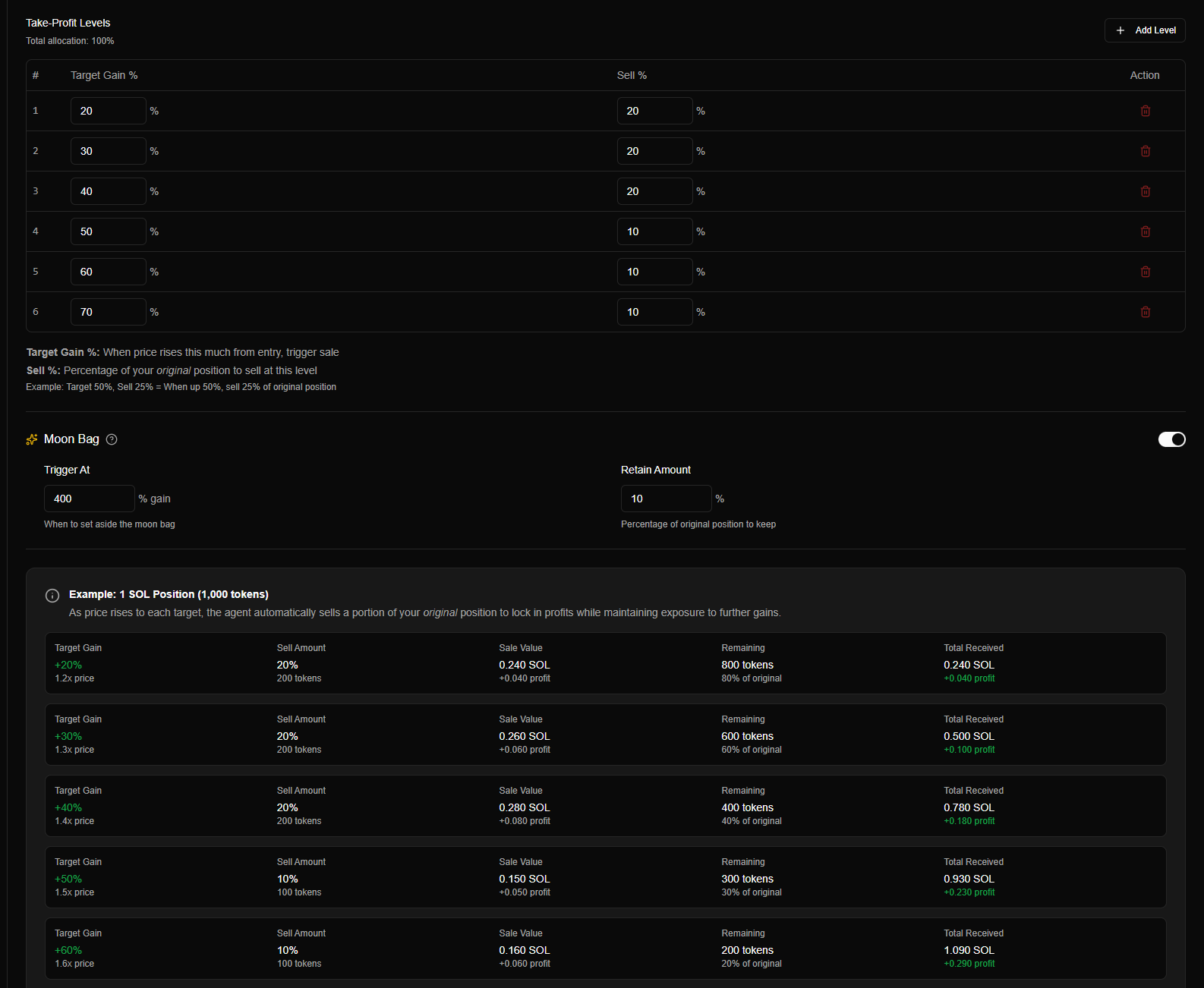
Custom mode levels editor showing manual level configuration
Adding Levels
Each level requires two values:
| Field | Description | Example |
|---|---|---|
| Target Percent (%) | Gain percentage to trigger this level | 100 (100% gain = 2x) |
| Sell Percent (%) | Percentage of original position to sell | 25 (sell 25%) |
How it works:
- Levels are evaluated from lowest to highest target percent
- All levels at or below current gain are triggered (gap handling)
- Each level's sell % is from the original position size
Level Requirements
Custom mode has specific requirements:
| Requirement | Details |
|---|---|
| Minimum levels | At least 1 level required when take-profit is enabled |
| Sorting | Levels must be sorted ascending by target percent (50%, 100%, 200%) |
| Target range | Target must be positive (1 to 10000+) |
| Sell range | Sell must be positive (1 to 100) |
| Total allocation | Sum of all sell % + moon bag % must be ≤ 100% |
Validation:
- System validates levels are sorted correctly
- System validates total allocation doesn't exceed 100%
- Invalid configurations prevent saving
Example Custom Configuration
Strategy: Aggressive early profit-taking with small moon bag.
Configuration:
Level 1: Target 30%, Sell 30%   → At 30% gain, sell 30%
Level 2: Target 75%, Sell 30%   → At 75% gain, sell 30%
Level 3: Target 150%, Sell 25%  → At 150% gain, sell 25%
Level 4: Target 300%, Sell 10%  → At 300% gain, sell 10%
Moon Bag: Trigger 150%, Retain 5%Behavior:
- 30% gain → Sell 30% of original
- 75% gain → Sell 30% of original
- 150% gain → Sell 25% of original + Moon bag activated (5% set aside)
- 300% gain → Sell 10% of original
- 5% retained as moon bag indefinitely
Total: 30% + 30% + 25% + 10% + 5% = 100% ✅
Configuration Best Practices
Choosing a Mode
| Use Case | Recommended Mode |
|---|---|
| Beginner trader | Moderate |
| Quick profits / volatile tokens | Aggressive |
| Strong conviction / let winners run | Conservative |
| Never want to fully exit | Moon Bag |
| Specific requirements | Custom |
Recommendation: Start with Moderate mode - it's balanced and works well for most traders.
Setting Take-Profit Levels
| Approach | Level Spacing | Best For |
|---|---|---|
| Tight levels | 25%, 50%, 75%, 100% | Quick profit-taking, volatile markets |
| Moderate levels | 50%, 150%, 300%, 400% | Balanced approach (default) |
| Wide levels | 100%, 200%, 400%, 600% | Let winners run, high conviction |
Moon Bag Settings
| Trigger % | Retain % | Strategy |
|---|---|---|
| 100% | 5% | Small exposure, early activation |
| 300% | 10% | Balanced (default) |
| 500% | 15% | Large moon bag, high conviction |
Recommendation: Start with 300% trigger and 10% retain. Adjust based on conviction level.
Risk Management
Important considerations:
- Use with stop loss - Take-profit locks gains, stop loss limits downside
- Don't over-allocate - Ensure total ≤ 100%
- Consider moon bag carefully - It's locked until stop loss or manual close
- Match to conviction - Higher conviction = higher targets, lower conviction = lower targets
Common Questions
Can I use Take Profit and DCA together?
Yes. You can enable both on the same agent. Take Profit sells portions as price rises; DCA buys more as price drops. The engine supports both simultaneously and evaluates them independently on each price update.
Why? DCA buys more when price drops, while Take Profit sells when price rises. Running both together would create conflicting signals and complex edge cases.
What happens if I disable Take Profit?
When disabled:
- No automatic sales on price increases
- Position held until stop loss or manual close
- Any previously sold amounts remain sold (take-profit is permanent)
Does Take Profit work in simulation mode?
Yes! Take Profit works identically in both simulation and live modes. Test your strategy in simulation before going live.
What if price drops after a take-profit sale?
Take-profit sales are permanent. If you sold 25% at 50% gain and price drops to 20%, you've already locked in profit on that 25%. The remaining 75% is still exposed to price movement.
Summary Table
| Setting | Description | Default |
|---|---|---|
| Enable Take Profit | Turn on/off | Disabled |
| Mode | Preset or custom levels | Moderate |
| Levels | Gain targets + sell percentages | Mode-dependent |
| Moon Bag Enabled | Retain portion permanently | Mode-dependent |
| Moon Bag Trigger | Gain % to activate | 300% |
| Moon Bag Retain | % of original to keep | 10% |
Take Profit and DCA can both be enabled. They work together: Take Profit locks in gains on rises; DCA averages down on dips.